Can You Change Your Username on Minecraft Java?
Yes, you can change your username on Minecraft Java Edition. Your in-game name in Java Edition is called your Java Profile Name, and you can change it through your Minecraft account.
Minecraft Java Profile Names are separate from your Microsoft/Xbox Gamertag. If your goal is to change the name other players see when you play Java Edition, you need to change your Java Profile Name, not your Xbox Gamertag. Minecraft currently allows Java Profile Names to be changed once every 30 days, and they can be up to 16 characters long.
If you’re still deciding what name to use, you can browse our collection of Minecraft usernames or generate ideas with our Minecraft username generator.
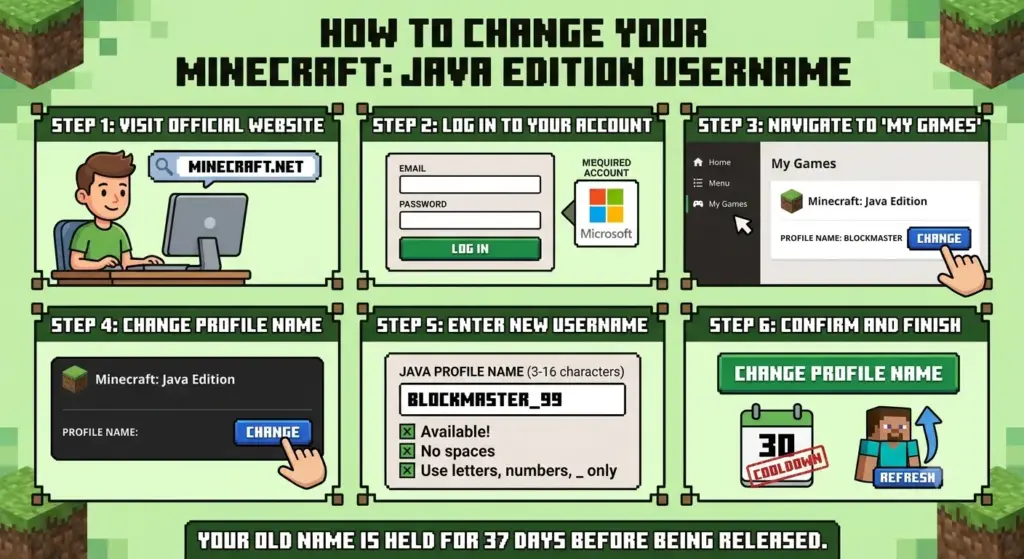
How to Change Your Minecraft Java Username
Changing your Minecraft Java username is relatively simple. You don’t need to create a new Minecraft account just to change your Java Profile Name.
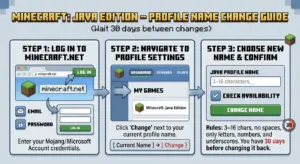
Follow these steps:
1. Sign in to Minecraft.net
Go to Minecraft.net and sign in with the Microsoft account associated with your Minecraft Java Edition account.
2. Open your Minecraft account
Once you’re signed in, go to All Games and find your Minecraft: Java Edition profile.
3. Select “Change Profile Name”
Under Minecraft: Java Edition, look for the Change Profile Name option.
4. Enter your new username
Enter the new Java Profile Name you want to use.
Before confirming the change, check the spelling carefully. Java Profile Names can be up to 16 characters, and you won’t be able to change the name again immediately after making a change.
If you’re worried that your preferred name might already be unavailable, learn how to check if a Minecraft username is taken before choosing one.
5. Confirm your new profile name
Select the option to change your profile name and complete the process.
Your new Java Profile Name will then be associated with your existing Minecraft Java profile.
How Often Can You Change Your Minecraft Java Username?
You can change your Minecraft Java Profile Name once every 30 days.
For example, if you change:
ShadowMiner → DarkPlayer
you cannot immediately change it again if you decide you don’t like DarkPlayer. You’ll need to wait until the 30-day cooldown has passed.
Because of this cooldown, it’s a good idea to choose your next name carefully.
Before making the change, you can explore good Minecraft usernames or browse unique Minecraft usernames for inspiration.
How Long Can a Minecraft Java Username Be?
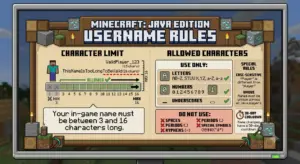
A Minecraft Java Profile Name can contain up to 16 characters.
This means a name such as:
- Steve — 5 characters
- PixelKnight — 11 characters
- ShadowMinecraft — 15 characters
fits within the limit.
A name such as:
- UltimateMinecraftPro — 20 characters
would be too long.
If you’re specifically looking for shorter names, check out our guide to how long a Minecraft username can be or browse these short OG Minecraft usernames.
Minecraft Java Username vs. Microsoft Gamertag
One of the most common sources of confusion is the difference between your Minecraft Java Profile Name and your Microsoft/Xbox Gamertag.
For Minecraft Java Edition, your in-game character name is your Java Profile Name, not your Gamertag, although the two names can be identical.
| Feature | Java Profile Name | Microsoft/Xbox Gamertag |
|---|---|---|
| Used as your Java Edition in-game name | Yes | No |
| Separate from the other name | Yes | Yes |
| Managed through the Minecraft Java profile | Yes | No |
| Used for Xbox services | No | Yes |
| Java name limit | Up to 16 characters | Separate rules |
| Java name cooldown | 30 days | Separate system |
So if you want to change the name that other players see in Minecraft Java Edition, change your Java Profile Name rather than your Xbox Gamertag.
For a broader explanation, see our guide on how to change a Minecraft username.
What Happens When You Change Your Minecraft Username?
Changing your Java Profile Name does not mean you’re creating a new Minecraft account.
You’re simply changing the profile name associated with your existing Java Edition profile.
Before changing your name, make sure that:
- You’re signed into the correct Microsoft account.
- You’ve selected the correct Minecraft Java profile.
- Your new name meets the current requirements.
- Your name is no longer than 16 characters.
- You’re comfortable with the 30-day cooldown.
- You’ve checked the spelling carefully.
If you’re still deciding what name to use, our guide on how to choose a good Minecraft username can help you narrow down your options.
Can You Change Back to Your Old Minecraft Username?
Yes, but you cannot immediately switch back.
Minecraft’s current support documentation states that after changing your Java Profile Name, you can return to your old name after waiting 30 days.
For example:
Old name: ShadowMiner
New name: DarkPlayer
If you later decide that you prefer ShadowMiner again, you need to wait for the applicable cooldown before changing your profile name back.
This is why you should think carefully before confirming a new name.
If your previous name appears unavailable, you can also read why your Minecraft username may be taken.
Why Can’t I Change My Minecraft Username?
There are several reasons why you might not be able to change your Minecraft Java username.
You Recently Changed It
The first thing to check is the 30-day cooldown.
Minecraft currently limits Java Profile Name changes to once every 30 days.
If you’ve changed your name recently, you may simply need to wait until the cooldown expires.
Your Name Is Too Long
Java Profile Names can be up to 16 characters.
If your preferred name exceeds the limit, try shortening it.
You can read more about how long a Minecraft username can be before choosing your final name.
You’re Signed Into the Wrong Microsoft Account
Make sure you’re signed into the Microsoft account that owns the Minecraft Java Edition profile you want to modify.
If you’re signed into a different account, you may not see the Java profile you expect.
You’re Trying to Change Your Gamertag
If you’re changing your Microsoft/Xbox Gamertag and expecting your Minecraft Java name to change, you’re changing a different account identifier.
Remember:
Java Profile Name ≠ Xbox Gamertag
You’re Following an Old Minecraft Tutorial
Some older Minecraft username guides refer to the previous Mojang account-management system.
Minecraft’s account system has changed, so older tutorials may contain outdated instructions.
For the current Java process, Minecraft’s official support documentation says to sign in at Minecraft.net, open All Games, select Minecraft: Java Edition, and choose Change Profile Name.
How to Choose a Good Minecraft Username
If you’re changing your username because you want something cooler, more memorable, or more unique, don’t rush your decision.
A good Minecraft username should ideally be:
- Short and easy to type
- Easy to remember
- Easy to pronounce
- Appropriate for multiplayer servers
- Free from unnecessary numbers
- Something you’ll still like months or years from now
- Within Minecraft’s 16-character limit
You should also avoid using personal information such as your real name, birthday, phone number, or location.
Minecraft Username Ideas
If you don’t know what type of username you want, start by choosing a style.
For example, you can explore:
- Minecraft usernames for girls
- Minecraft names for boys
- Cool Minecraft usernames
- Cute Minecraft usernames
- Aesthetic Minecraft usernames
If you play on an SMP or enjoy competitive Minecraft, you may prefer a different style. Check out:
For something more specific, you can also explore:
Taking some time to compare different naming styles can help you avoid using your 30-day name change on a username you don’t actually like.
Should You Change Your Minecraft Username?
Whether you should change your Minecraft username depends on why you want to change it.
Changing your name can make sense if:
- You no longer like your current username.
- Your old name feels outdated.
- You want a more memorable gaming identity.
- You’re starting a YouTube or streaming channel.
- You want a name that better matches your Minecraft content.
- You’ve found a shorter or more unique username.
However, because Java Profile Names have a 30-day cooldown, don’t change your name just because you found a random alternative that looks slightly better.
If you’re building a gaming identity, think about whether you’ll want to use the same name across other platforms as well.
Can You Use Your Minecraft Username on Other Platforms?
You can choose a username that matches your identity on other gaming or social platforms, but Minecraft’s Java Profile Name system is separate from those services.
Before choosing a name for branding, check whether the name is available on the platforms you care about.
If you’re building a broader gaming identity, you can also explore our gaming usernames collection for ideas.
Frequently Asked Questions
Can you change your username on Minecraft Java?
Yes. You can change your Minecraft Java Edition Java Profile Name through Minecraft.net. Minecraft currently allows a Java Profile Name to be changed once every 30 days.
For a dedicated walkthrough, see how to change a Minecraft username.
Is changing a Minecraft Java username free?
Changing your Java Profile Name is an account profile-name change and is separate from changing an Xbox/Microsoft Gamertag.
How often can I change my Minecraft Java username?
You can change your Java Profile Name once every 30 days.
What is the Minecraft Java username character limit?
A Minecraft Java Profile Name can contain up to 16 characters.
You can read more about Minecraft username length if you’re choosing a short name.
Does changing my Minecraft username change my Microsoft Gamertag?
No. Your Minecraft Java Profile Name and Microsoft/Xbox Gamertag are separate identifiers. Minecraft’s official support documentation specifically distinguishes the Java Profile Name from the Gamertag.
Can I change my Minecraft username back?
Yes. Minecraft states that you can return to your old Java Profile Name after waiting 30 days.
Do I need a new Minecraft account to change my username?
No. You can change the Java Profile Name associated with your existing Minecraft Java Edition account.
Can I use spaces in a Minecraft Java username?
You should follow Minecraft’s current Java Profile Name requirements rather than assuming that spaces or every special character will be accepted.
If you’re choosing a new name, using our Minecraft username generator can help you generate ideas before checking which names meet Minecraft’s requirements.
Why does my old Minecraft username still appear somewhere?
Minecraft has several different account identifiers, including the Java Profile Name and Microsoft/Xbox Gamertag. Because these are separate systems, you shouldn’t assume that changing one will automatically change every name associated with your Microsoft or gaming accounts.
Final Thoughts
Yes, you can change your username on Minecraft Java Edition. The name you change is your Java Profile Name, and Minecraft currently allows you to change it once every 30 days. Java Profile Names can be up to 16 characters long.
The most important thing is to choose your new name carefully because you won’t be able to change it again immediately.
Before making the switch, check whether your preferred username is available, make sure it fits the character limit, and consider whether it matches the identity you want to use for Minecraft, gaming, streaming, or content creation.
If you still need ideas, start with our Minecraft username generator, then explore unique Minecraft usernames or cool Minecraft usernames to find a name that fits your style.