Gaming

How to find a Minecraft username that isn't taken

How Do I Find a Minecraft Username That Isn’t Taken?

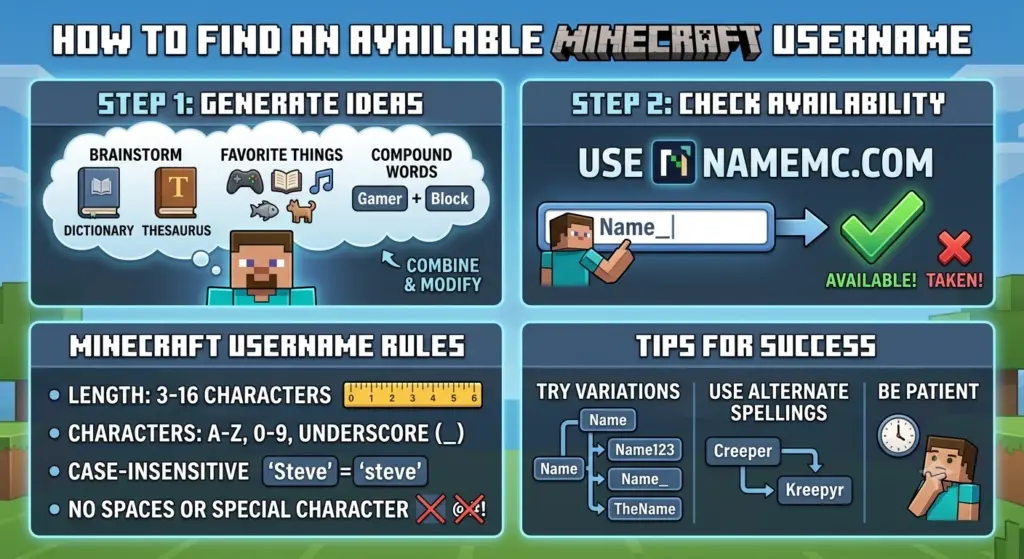
How Do I Find a Minecraft Username That Isn’t Taken? Finding a Minecraft username that isn’t taken can be difficult, especially when you want a name that is short, memorable, unique, and fits your personality. Millions of Minecraft players have already created accounts, so many obvious names are unavailable. However, with the right approach, we can find plenty of creative username ideas and improve our chances of discovering an available name. The easiest approach is to start with a Minecraft username generator, create several variations, and then check whether the names are available before choosing one. We can also combine words, numbers, prefixes, suffixes, and different themes to create usernames that feel original instead of simply copying common names. In this guide, we will cover practical ways to find a Minecraft username that isn’t taken, generate unique ideas, check username availability, and create a name that works well for Minecraft. Use a Minecraft Username Generator One of the fastest ways to find an available Minecraft username is to use a Minecraft username generator. A good generator can combine different words, themes, styles, and naming patterns to produce hundreds of ideas. Instead of manually thinking of one username at a time, we can generate a large list and then shortlist the names we like. For example, if we want a username based around the word “Shadow,” we could create variations such as: ShadowForge ShadowCrafter ShadowNexus ShadowKnight ShadowPixel ShadowRush ShadowVale ShadowFlare ShadowDrift ShadowMiner If the first choice is unavailable, we can try a related variation rather than completely changing the concept. Check if the Minecraft Username Is Taken After finding a username we like, the next step is to check whether the Minecraft username is already taken. A username can look unique but still belong to another player. This is particularly common with short names, dictionary words, popular gaming terms, and names containing words such as: Shadow Dragon Ninja Gamer Wolf Killer Ghost Pro King Craft Pixel Fire Before settling on a name, we should verify its current availability through a reliable Minecraft username-checking method. This is especially important when choosing a short or highly desirable username because the most obvious combinations are often already registered. Create Unique Minecraft Username Combinations One of the best ways to find a username that isn’t taken is to combine two or more unrelated words. Instead of choosing a common name like Shadow, we can combine it with another distinctive word: ShadowQuartz ShadowCanyon ShadowOrbit ShadowMeadow ShadowComet ShadowLantern ShadowRaven ShadowHarbor ShadowEmber ShadowFrost This method gives us much more flexibility. We can also combine an adjective with a gaming-related noun: SilentMiner CosmicCrafter FrozenKnight MysticBuilder AncientPixel LunarWarrior CrimsonMiner HiddenCrafter ElectricWolf SavageQuartz The more unusual the combination, the better our chances of finding something that has not already been used. Try Short Minecraft Username Variations Short Minecraft usernames are highly desirable because they are easy to remember and look clean in-game. Unfortunately, short names are also among the hardest to find. If a four- or five-letter username is already taken, we can create variations around the same idea. For example, instead of: Frost we could try: FrostX FrostyX FrostZen FrostNova FrostByte FrostCore FrostVex FrostRune Instead of: Raven we could try: RavenX RavenVoid RavenArc RavenZen RavenPeak RavenRush RavenVex This keeps the original identity while creating a more distinctive username. Use Uncommon Words Another effective strategy is to use words that are less frequently used by Minecraft players. Common words such as “Dragon,” “Wolf,” and “Ninja” are likely to have many combinations already registered. More unusual words can provide better opportunities. For example: Obsidian Nebula Zenith Aether Vortex Ember Quasar Rune Solstice Eclipse Relic Mirage Tempest Nova Monolith We can combine these with gaming terms to create names such as: ObsidianForge AetherKnight RuneHunter QuasarCraft EmberVale ZenithMiner MiragePixel TempestForge RelicRunner NovaCrafter These names can sound distinctive without being unnecessarily complicated. Add a Unique Prefix or Suffix Adding a short prefix or suffix is another simple way to transform an unavailable username into a new variation. Useful prefixes include: Its The Real Hey Mr Neo Dark ItsMe Just Im Useful suffixes include: X HQ TV GG MC FX Pro Plays Zone Live For example: Original: Shadow Variations: ItsShadow ShadowMC ShadowHQ ShadowFX ShadowGG NeoShadow ShadowZone JustShadow However, we should avoid adding random characters simply to make a name available if the result becomes difficult to read or remember. Combine Minecraft-Related Words Minecraft provides an enormous vocabulary that can be used to create themed usernames. For multiplayer community inspiration, browse these Minecraft SMP names. We can use words inspired by: Mining Crafting Redstone Nether End Villagers Diamonds Emeralds Creepers Skeletons Endermen Biomes Enchantments Tools Armor Building PvP Examples include: DiamondForge NetherRune RedstoneRush EnderKnight CreeperCore EmeraldForge NetherPixel EnderVale ObsidianMiner RedstoneWolf These usernames immediately communicate a Minecraft-related identity while still allowing us to create original combinations. Try Aesthetic Minecraft Usernames Players who want a softer or more stylish identity can use aesthetic Minecraft usernames. Aesthetic names often combine short words associated with nature, space, colors, seasons, or fantasy. Examples include: LunarBloom MistyNova MoonlitVale VelvetPixel FrostedMoon StarryRune CloudyEmber MysticBloom LunarEcho SilentAurora If one of these is unavailable, we can modify the second word rather than adding a long string of numbers. For example: LunarBloom → LunarVale → LunarEcho → LunarRune → LunarMist This creates a family of usernames while preserving the same style. Find Rare Minecraft Username Ideas If our goal is to find a rare Minecraft username, we should avoid combinations that are extremely predictable. Instead of using: CoolGamer123 we can create something more distinctive: Vexora Lunavex Zenvora Arclune Nexora Velmora Zypheron Ravexis Solvane Emberix Invented names can be especially useful because they are not tied to common dictionary phrases. We can create an invented username by combining sounds from two words: Nova + Vex = Novavex Lunar + Zen = LunarZen Pixel + Rune = PixelRune Shadow + Arc = ShadowArc This approach can produce names that sound like gaming identities while remaining relatively uncommon. Avoid Using Too Many Random Numbers Adding numbers can help create

How Do I Find a Minecraft Username That Isn’t Taken? Read More »
How to find a Roblox username that is not taken

How to Find a Roblox Username That Is Not Taken

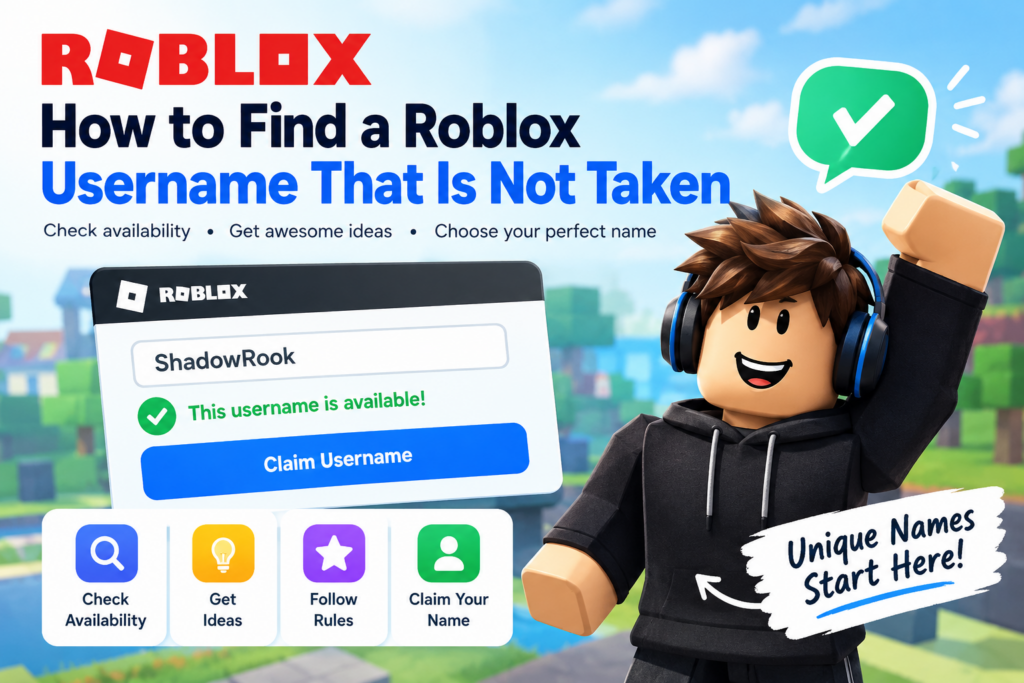
How to Find a Roblox Username That Is Not Taken (2026 Guide) Finding a Roblox username that is not taken can be frustrating. You think of a cool name, enter it on Roblox, and discover that someone else has already claimed it. You try another option, but that one is unavailable too. Since many players prefer short, memorable names, finding the right combination takes creativity and patience. The good news is that you do not need to settle for a username filled with random numbers or confusing letters. You can combine uncommon words, experiment with different styles, and use a Roblox Username Generator to discover fresh ideas. The key is to understand Roblox’s username rules and verify your favorite choices directly on the platform. In this guide, you will learn how to find an available Roblox username, check its availability, understand the difference between usernames and display names, and explore more than 200 username ideas. Whether you prefer cool, cute, aesthetic, funny, short, or rare names, these strategies will help you create a memorable gaming identity. How to Check If a Roblox Username Is Available The easiest way to check whether a Roblox username is available is to enter it during account registration or use the username-changing option in your existing account settings. Roblox provides feedback when you submit a username, helping you determine whether it meets the requirements and can be used. Visit the official Roblox website and open the sign-up form if you are creating a new account. Enter your preferred username and follow the instructions on the screen. If you already have an account, open Settings, select Account Info, and look for the option to change your username. Changing an existing username requires Robux. Follow these steps to make the process easier: Create a shortlist of five to ten username ideas. Check that each name follows Roblox’s character and formatting rules. Enter your favorite username on Roblox. Follow the availability feedback provided by the platform. If your preferred name is unavailable, try another variation. You can also use our guide on how to check Roblox username availability for additional help. A generator can suggest possible names, but Roblox itself is the source to use for confirming whether a username is available. Roblox Username Rules You Should Know Before spending time testing different names, learn the basic Roblox username requirements. A username can be rejected because it belongs to another account, but it can also fail because it does not follow the platform’s rules. Understanding the difference will help you avoid unnecessary attempts. Roblox usernames must contain between 3 and 20 characters. They can include letters and numbers, with no more than one underscore. An underscore cannot appear at the beginning or end of a username. Roblox also applies moderation and privacy requirements, so a name that appears technically valid may still be rejected. Rule Requirement Minimum length 3 characters Maximum length 20 characters Letters and numbers Allowed Underscores Maximum of one Underscore placement Not at the beginning or end Spaces Not allowed in usernames Personal information Avoid sensitive information Inappropriate words Must comply with Roblox rules For example, FrostRook, Pixel_Raven, and NovaFox27 follow the basic character pattern. However, that does not mean these names are available. If you want to understand the permitted length in more detail, read our guide on how many characters a Roblox username can have. You should also understand whether Roblox usernames can have spaces. Usernames cannot contain spaces, although display names can. Avoid including your full name, phone number, home address, or other personal details in a public gaming identity. If Roblox rejects a name that appears to follow the formatting rules, try a different word combination. The platform may be applying moderation filters, so do not attempt to disguise inappropriate words with numbers or unusual spellings. Username vs. Display Name: What Is the Difference? Roblox has two different naming options: usernames and display names. Understanding how they work can save you time when your favorite name is already taken. Your username is the unique identifier associated with your account. Another account cannot use the same username. Your display name, however, does not need to be unique, so several players can share the same display name. Feature Username Display name Must be unique Yes No Can contain spaces No Yes Change cost Requires Robux Free Change frequency Each change requires Robux Generally once every seven days Main purpose Identifies your account Personalizes your visible identity Suppose you want the username MoonlitFox, but Roblox says it is unavailable. You could try a variation such as MoonlitFox07 and use MoonlitFox as your display name if Roblox accepts it. If you already have an account and want to update its username, follow our guide on how to change your Roblox username. Remember that changing a username is different from changing a display name. 7 Proven Ways to Find a Roblox Username That Is Not Taken The best way to find an available Roblox username is to create combinations instead of repeatedly trying popular single words. Common names such as Shadow, Ninja, Gamer, and Legend are attractive because they are simple, but that also makes them difficult to claim. Instead of relying on luck, use the following techniques to generate more possibilities. Start with your preferred style, create a list of alternatives, and test the most promising names directly on Roblox. 1. Combine Two Uncommon Words Combining two words is one of the easiest ways to create a distinctive username. Choose a word that reflects your personality or preferred aesthetic, then pair it with another word that adds character. For example, combining Frost and Rook creates FrostRook, while Ember and Fox produce EmberFox. You can also experiment with combinations such as LanternKnight, MarbleNova, CinderRaven, or VelvetScout. Try to avoid combinations that sound too predictable. Instead of using another variation of DarkGamer, experiment with less common words such as Cinder, Fable, Quill, Moss, Orbit, or Lantern. A simple formula is theme word + identity word. Create

How to Find a Roblox Username That Is Not Taken Read More »

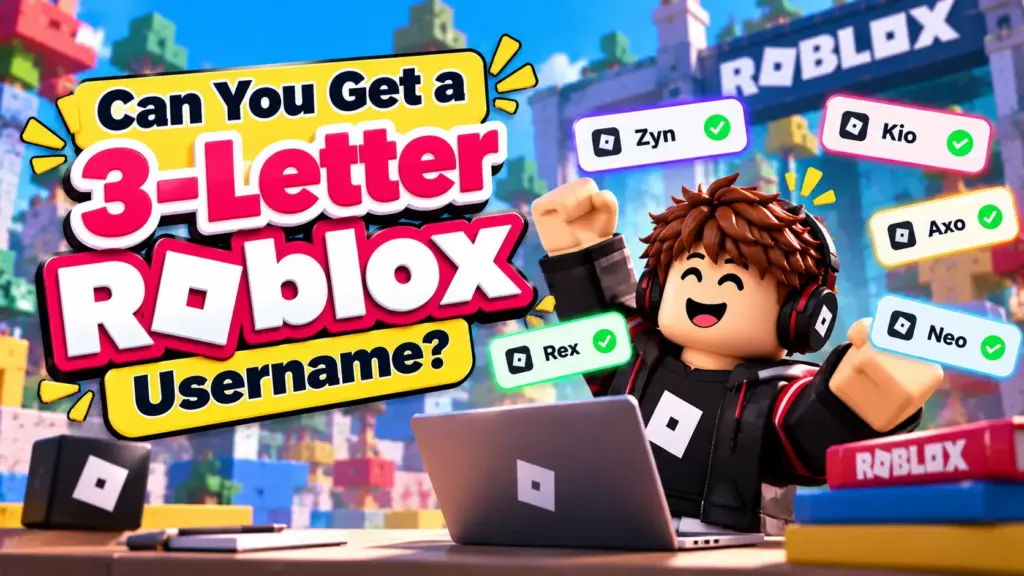
Can You Get a 3-Letter Roblox Username?

Can You Get a 3-Letter Roblox Username? [2026 Guide]

Can You Get a 3-Letter Roblox Username? Yes, 3-letter Roblox usernames are technically possible. Roblox’s username requirements allow usernames to contain at least three characters, which makes a three-character username the shortest standard username you can create. However, there is an important difference between a 3-letter Roblox username being allowed and a particular three-letter username being available. Many short and memorable combinations have already been claimed, making desirable three-letter usernames difficult to find. If you are searching for a short, clean, and memorable Roblox name, understanding how username length, availability, numbers, underscores, and display names work can help you find better options. In this guide, we will explain whether you can get a 3-letter Roblox username, why these names are difficult to find, how to search for them, and what alternatives you can use when your preferred name is already taken. Are 3-Letter Roblox Usernames Allowed? Yes. Roblox’s published username requirements specify a minimum length of 3 characters and a maximum of 20 characters. This means usernames such as: Zex Kyo Ryn Vox Nix A7X Q8R X9V can fit the basic three-character length requirement. However, meeting the character-length requirement does not guarantee that Roblox will allow you to register a specific name. The username must also be available and comply with Roblox’s username rules. If you want to understand the complete length requirements, see our guide on how many characters a Roblox username can have. Why Are 3-Letter Roblox Usernames So Hard to Find? The main problem is availability. There are only a limited number of possible combinations when usernames are restricted to three characters. Roblox has a huge user base, and short usernames have been desirable for years. A three-letter username is attractive because it is: Short Easy to remember Easy to type Visually clean Suitable for gaming Often perceived as rare Useful for personal branding For example, Vex is considerably easier to remember than a long username containing multiple numbers and symbols. Because of this, simple three-letter combinations can be difficult to obtain. If you are interested in shorter names beyond three characters, explore our collection of short Roblox usernames for additional ideas. How Many 3-Character Roblox Usernames Are Possible? The theoretical number depends on which characters we include. If we consider only the 26 English letters and allow letters to repeat, there are: 26 × 26 × 26 = 17,576 possible three-letter combinations. For example: AAA AAB AAC AAD and so on. If numbers are included, the number of possible combinations becomes considerably larger. However, this mathematical calculation does not tell us how many usernames are currently available. Many combinations may already be registered, unavailable, restricted, or unsuitable under Roblox’s rules. Therefore, there is an important distinction between possible combinations and available Roblox usernames. If you need more inspiration, our collection of Roblox username ideas can help you explore additional combinations. Can You Still Find an Available 3-Letter Roblox Username? It is possible to find short usernames that are available, but desirable three-letter names can be extremely difficult to find. The easiest names to remember are often the most competitive. For example, names such as: Ace Fox Max Zen Sky Pro are more recognizable than random combinations. Many obvious names have already been claimed. Instead of searching exclusively for common words, consider unusual combinations such as: Qev Zyn Vok Xel Ryv Kez Juv Wex These can provide a similar short and clean appearance without relying on common dictionary words. Once you find a name you like, you should check Roblox username availability before assuming that the username can be registered. What Characters Can a Roblox Username Contain? Roblox’s published requirements allow usernames to contain letters and numbers, with specific restrictions on underscores. Roblox allows up to one underscore, and the underscore cannot appear at the beginning or end of the username. For example, these types of names can fit the general character requirements: Vex V3x X7R K_9 A7Z However, the exact username still needs to be available and comply with Roblox’s current rules. This is important because adding random punctuation, spaces, or unusual symbols is not a reliable way to create a three-character username. 3-Letter Roblox Username vs. Display Name One of the biggest sources of confusion is the difference between a Roblox username and a display name. Your username is the unique identifier associated with your Roblox account. A display name works differently and does not necessarily have to be unique. This means that seeing someone with a very short name on Roblox does not automatically mean that their actual username is a rare three-letter username. The name you see above a player’s avatar may be their display name. Understanding this difference is particularly important when searching for rare Roblox usernames. You can explore more examples in our guide to rare Roblox usernames. Can a 3-Letter Roblox Username Have Numbers? Yes. Roblox’s published requirements allow alphanumeric characters, meaning letters and numbers can be used. This creates additional possibilities for short usernames. For example: A7X V2N K9R X4Z Q8V R2X These are not strictly three-letter usernames because they contain numbers, but they are still three-character usernames. If you cannot find a three-letter combination that you like, replacing one letter with a number can create additional possibilities. Can a 3-Letter Roblox Username Have an Underscore? Roblox allows up to one underscore in a username, but it cannot be placed at the beginning or end. For example: A_B uses three characters with an underscore in the middle. However, availability and Roblox’s current validation rules still apply. The important point is that an underscore cannot simply be placed anywhere. A format such as _AB or AB_ does not satisfy the stated underscore placement requirement. Why Is My 3-Letter Roblox Username Taken? If Roblox tells you that a three-letter username is unavailable, the exact username cannot currently be registered to your account. Short usernames are particularly competitive because there are relatively few combinations and many players prefer names that are: Short Memorable Easy to pronounce Easy to type Visually attractive

Can You Get a 3-Letter Roblox Username? [2026 Guide] Read More »

Can Roblox usernames have spaces

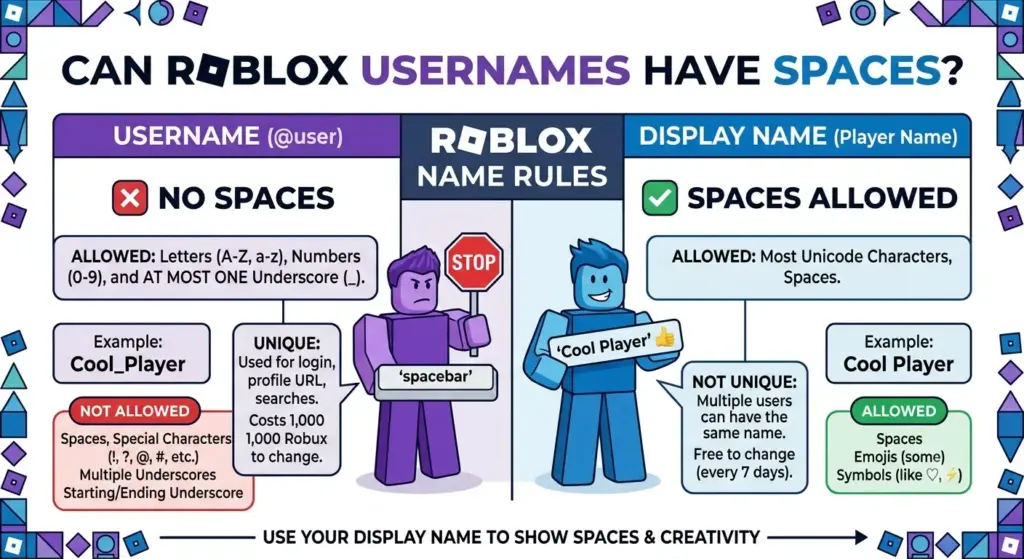
Can Roblox Usernames Have Spaces? Roblox Username Rules

Can Roblox Usernames Have Spaces? If you are creating a new Roblox account or changing your existing username, you may wonder: Can Roblox usernames have spaces? The short answer is no. Roblox usernames cannot contain spaces. A Roblox username must follow Roblox’s username requirements, which means spaces are not accepted as part of the actual username. However, Roblox has another name option called a Display Name, and this creates some confusion because display names work differently from usernames. Understanding the difference between a Roblox username and a display name is important if you want to create a clean, stylish, or easy-to-remember identity on the platform. In this guide, we will explain whether Roblox usernames can have spaces, how Roblox usernames are formatted, whether display names can contain spaces, and what alternatives you can use if you want a username that looks separated into multiple words. If you are still looking for inspiration, you can also explore our collection of Roblox username ideas for additional naming ideas. Can Roblox Usernames Have Spaces? No, Roblox usernames cannot have spaces. When creating a Roblox username, spaces are not allowed between words. For example, usernames such as: Cool Gamer Pro Player Shadow Ninja Gaming Legend Dark Warrior cannot be used as Roblox usernames because they contain spaces. A username such as CoolGamer, however, can be used if it is available and complies with Roblox’s current username requirements. The restriction applies to the actual username associated with the Roblox account. Roblox usernames are designed to function as unique account identifiers, so they use a specific format rather than allowing unrestricted text. If you are trying to create a short and memorable username instead, you may also want to browse these short Roblox usernames for ideas. Why Can’t Roblox Usernames Have Spaces? Roblox usernames serve as unique identifiers for accounts. They are used throughout the Roblox platform for identifying players, profiles, experiences, and other account-related interactions. Allowing spaces could create additional complications when usernames are used as identifiers. Instead, Roblox uses a username format that does not allow spaces. If you want multiple words in your username, the easiest solution is usually to combine them together. For example, instead of: Dragon Slayer you could create: DragonSlayer You could also modify the idea with an additional word or number: DragonSlayerX ItsDragonSlayer DragonSlayer99 RealDragonSlayer These alternatives keep the basic idea while avoiding an actual space. Can Roblox Display Names Have Spaces? Yes, Roblox Display Names are different from usernames and can appear as separate words. This is one of the most important distinctions to understand. Your username is your unique account identifier, while your display name is the name other players can see in many parts of the Roblox experience. For example, an account might have a username such as: ShadowGamer482 while the display name could appear as: Shadow Gamer This makes the profile look cleaner without requiring the actual username to contain a space. Display names therefore provide a useful solution for players who want their Roblox identity to look like two or more separate words. If you are comparing different Roblox naming styles, our guides to cool Roblox usernames and aesthetic Roblox usernames can also help you find a style that works well as a display name. Roblox Username vs. Display Name The difference between these two names can be summarized as follows: Feature Roblox Username Roblox Display Name Must be unique Yes No Can contain spaces No Can appear as separate words Used as account identifier Yes No Can be changed Yes, subject to Roblox rules Yes, subject to Roblox rules Shown to other players Yes Yes Same name can be used by others No Yes Used to identify the account Yes No The username remains the unique account identifier, while the display name provides more flexibility for how the player presents their identity. For players who are still deciding between different naming styles, our guide comparing cool vs. cute vs. badass usernames can help narrow down the right style. How to Make a Roblox Username Look Like It Has Spaces Although an actual Roblox username cannot contain spaces, we can make a username look easier to read by combining words intelligently.   1. Capitalize Each Word One simple technique is using capital letters to separate words. For example: ShadowHunter DarkKnight PixelWarrior CoolGamer FireDragon NightPlayer The capital letters visually divide the username even though there are no actual spaces. This style is commonly used in gaming usernames because it improves readability while keeping the name compact. 2. Use Numbers Numbers can also help create a distinctive username. Examples include: ShadowGamer21 DarkPlayer99 PixelMaster7 DragonHunter24 ProGamer2026 Numbers can be useful when the original username is already taken. However, we recommend avoiding unnecessarily long strings of random numbers because they can make a username harder to remember. If you want more ideas without relying heavily on numbers, check out our unique Roblox usernames collection. 3. Create a Shorter Variation Sometimes the best solution is simply to shorten the original name. For example: Original idea: Shadow Dragon Warrior Possible alternatives: ShadowDragon DragonWarrior ShadowWarrior SDWarrior ShadowDW This approach can make the username easier to remember while keeping its original identity. Can You Put a Space at the Beginning or End of a Roblox Username? No. Adding a space at the beginning or end does not provide a legitimate way to create a spaced Roblox username. Roblox usernames have specific formatting requirements. A username cannot simply be manipulated by inserting invisible or extra spaces around the name. If a username generator suggests a username with spaces, those spaces should be treated as formatting unless the resulting name has been confirmed to comply with Roblox’s current rules. Players should also avoid attempting to bypass username restrictions with unusual characters or invisible Unicode characters. A name that looks like it contains a space may not actually be accepted as a Roblox username. Can You Use Special Characters Instead of Spaces? This depends on the specific Roblox naming rules applicable to usernames. Not

Can Roblox Usernames Have Spaces? Roblox Username Rules Read More »

How Many Characters Can a Roblox Username Have?

How Many Characters Can a Roblox Username Have?

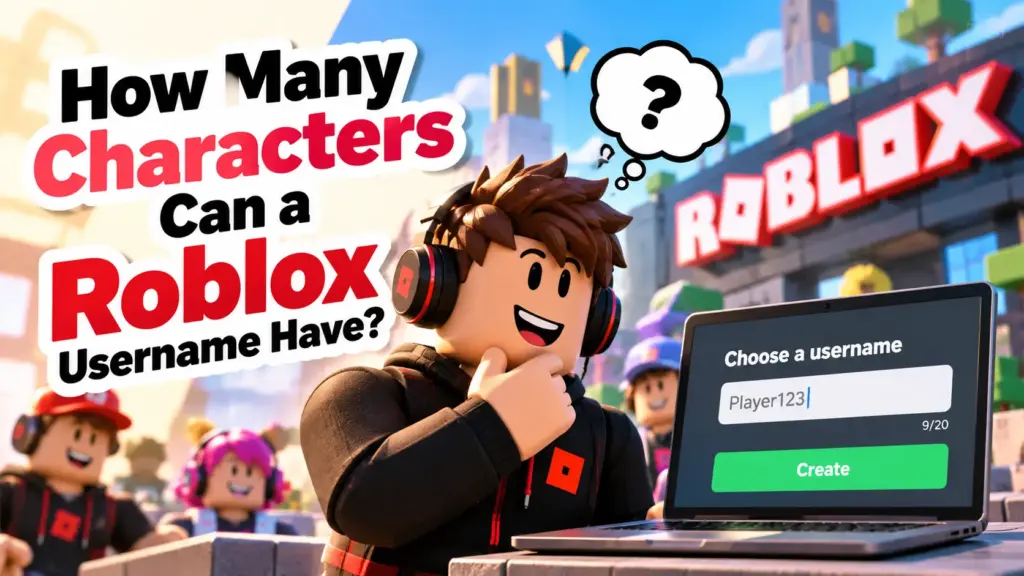
How Many Characters Can a Roblox Username Have? A Roblox username can have 3 to 20 characters. Anything shorter than 3 or longer than 20 gets rejected, no matter how good the name is. That is the short answer. But length is only one of the rules. Roblox also limits which characters you can use and where an underscore can go, so a name that fits the count can still fail. This guide covers all of it, with examples you can check your own name against. Want to skip the guesswork? Try our Roblox Username Generator to get names that already follow the length rules. Roblox Username Length at a Glance Rule Limit Minimum length 3 characters Maximum length 20 characters Allowed characters Letters (A-Z), numbers (0-9) Underscore One allowed, never at the start or end Spaces Not allowed Symbols and emojis Not allowed What Counts as a Character? Every letter, number and underscore counts as one character. Count the whole name, not just the letters. Vex = 3 characters (shortest allowed) NeonFang = 8 characters LaggyPotato = 11 characters ShadowNovaFrostWolf9 = 20 characters (longest allowed) ShadowNovaFrostWolf99 = 21 characters (too long) If you are close to the limit, remove a word or shorten one. Don’t try to squeeze in by dropping letters from the middle, because the name gets harder to read. Which Characters Can You Use? A Roblox username can include: Uppercase and lowercase letters Numbers One underscore It can’t include: Spaces Hyphens, dots or other punctuation Emojis or fancy font symbols Accented letters So Shadow Wolf and Shadow-Wolf both fail. ShadowWolf and Shadow_Wolf both work. The Underscore Rule This is the rule people miss most often. You can use an underscore, but: Only one is allowed. It can’t be the first character. It can’t be the last character. Username Valid? Why Shadow_Wolf Yes One underscore, in the middle _ShadowWolf No Starts with an underscore ShadowWolf_ No Ends with an underscore Shadow_Wolf_X No Two underscores xX_DarkViper_Xx No Two underscores CyberFrost_2026 Yes One underscore, in the middle A lot of name lists online show names like xX_DarkViper_Xx. Roblox won’t accept them, so don’t get attached to one. Why a Username Can Be Rejected Even at 3-20 Characters Fitting the length is only the first check. Roblox can still reject a name if: Someone already has it. Usernames are unique, and you can’t take one that belongs to another account. It breaks the Community Standards. Roblox filters usernames for profanity and inappropriate content. It looks like personal information. Real names, phone numbers, addresses and similar details aren’t a good idea in a username. If a name keeps getting rejected, change a word or add a short number. You can also try a different order of the same words. Username vs Display Name: Different Limits Roblox gives you two names, and people often mix them up. Username Display Name Unique to your account Yes No, others can share it Used to identify your account Yes No Cost to change Requires Robux Free How often you can change it Account setting Once every 7 days Characters 3-20, letters, numbers, one underscore Has its own character rules, so check the field when you edit it If you only want a different name to show to other players, changing your Display Name is usually enough. You don’t need to pay for a username change. Roblox can update these rules, so check the character limit shown in your account settings before you pick one. What Is the Best Length for a Roblox Username? You can use up to 20, but longer isn’t better. A good range is 6 to 14 characters. Short (3-6): Clean and easy to type, but most are already taken. Medium (7-12): Easy to remember and still gives you plenty of options. Long (13-20): Fine for two or three word combinations, but harder to read and type. Two short words usually beat one long random string. NovaRush is easier to remember than NovaRushXTheDestroyer07. Valid Roblox Username Examples All of these fit the 3-20 limit and follow the character rules: Short Vexo Zynx Nexo Kairo Medium ShadowVex FrostByte NeonFang StormRider With one underscore Shadow_Wolf Luna_Vibe Neon_Fox Frost_Byte With a number Nova21 Vex7 Zyro99 Check the full list of cool Roblox usernames for hundreds more ideas, sorted by style. How to Check Your Username Before Changing It Count the characters. Make sure it is between 3 and 20. Remove spaces, symbols and emojis. Check you have no more than one underscore, and not at the start or end. Read it out loud. If it is hard to say, it is hard to remember. Check availability on Roblox before you pay for a change. A username change costs Robux, so it is worth doing these checks first. How to Change Your Roblox Username Log in to your Roblox account. Open Settings. Select Account Info. Select Change Username. Enter the new username and your current password. Complete the Robux purchase. For the latest steps and pricing, check the official Roblox Support page on changing your username. Tips to Pick a Username Within the Limit Combine two short words, like a color and an animal. Skip long number strings. Keep it easy to spell. Avoid personal information. Keep it under 15 characters so it doesn’t look cluttered above your avatar. Have two or three backups ready, since your first choice may be taken. Frequently Asked Questions How many characters can a Roblox username have?  A Roblox username can have 3 to 20 characters. What is the minimum length of a Roblox username?  3 characters. Two-character names are not allowed. What is the maximum length of a Roblox username?  20 characters. A 21st character will be rejected. Can a Roblox username have spaces?  No. Use a single underscore instead, or join the words together. Can I use more than one underscore?  No. Only one underscore is allowed, and it can’t be at the start or end. Can I use symbols or emojis in my Roblox username?  No.

How Many Characters Can a Roblox Username Have? Read More »

Minecraft Java profile name change option

how do i change my minecraft username

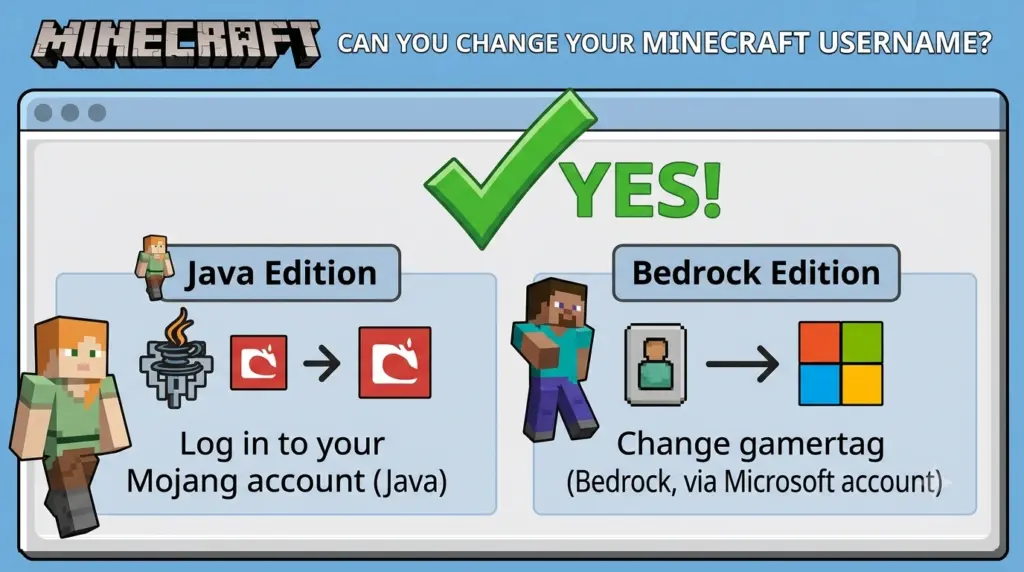
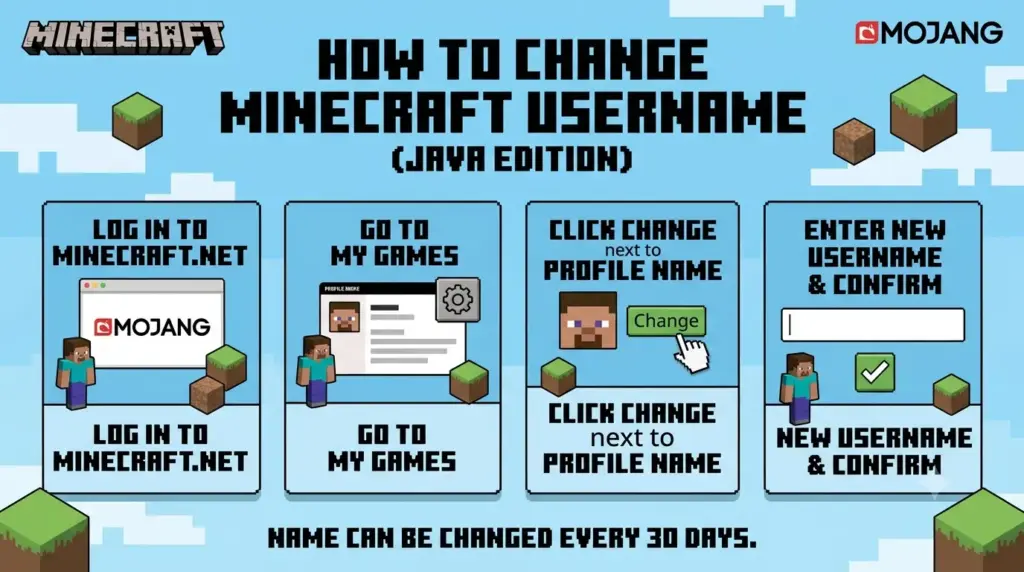
how do i change my minecraft username Yes, you can change your Minecraft username, but the process depends on which version of Minecraft you play. For Minecraft Java Edition, you can change your Java profile name through Minecraft.net. For Minecraft Bedrock Edition, your in-game name is generally connected to your Xbox/Microsoft gamertag. If you’re looking for a new Minecraft username, this guide explains exactly how to change it, how often you can change it, and what to do if your preferred name is already taken. Can You Change Your Minecraft Username? Yes, but Java and Bedrock Edition handle usernames differently. Minecraft Java Edition: You can change your Java profile name through your Minecraft account. Minecraft Bedrock Edition: Your in-game name is generally your Xbox/Microsoft gamertag. Java username limit: Java profile names can be up to 16 characters. Java name changes: You generally need to wait 30 days before changing your Java profile name again. Before choosing a new name, it’s also useful to understand how long a Minecraft username can be. How to Change Your Minecraft Java Username If you play Minecraft Java Edition, changing your profile name is relatively simple. Step 1: Sign In to Minecraft.net Go to Minecraft.net and sign in with the Microsoft account associated with your Minecraft Java Edition account. Make sure you’re using the correct account before changing anything. If you have multiple Microsoft accounts, check which one owns your Minecraft Java profile. Step 2: Open Your Minecraft Java Profile After signing in, find your Minecraft Java Edition profile. Look for the option to change your profile name. Minecraft provides a dedicated profile-name setting for Java Edition. Step 3: Select “Change Profile Name” Choose Change Profile Name and enter the username you want to use. Your new Java username should follow Minecraft’s username requirements. If you’re unsure about the character restrictions, read our guide on how long a Minecraft username can be. Step 4: Enter Your New Username Type your desired username into the available field. Before confirming the change, check the spelling carefully. It’s also a good idea to make sure the name fits the style you’re looking for. If you need inspiration, you can use our Minecraft username generator to find new name ideas. Step 5: Confirm the Change Once you’ve selected your new username, follow the instructions to confirm the change. Your new Java profile name will become the name displayed when you play Minecraft Java Edition. How to Change Your Minecraft Bedrock Username Minecraft Bedrock Edition works differently from Java Edition. When you’re playing Bedrock Edition while signed into a Microsoft account, your Minecraft name is generally associated with your Xbox gamertag. Therefore, if you want to change your Bedrock Minecraft name, you generally need to change your Xbox/Microsoft gamertag rather than a separate Minecraft Java profile name. The exact steps can vary depending on the platform you’re using, such as Windows, Xbox, PlayStation, Nintendo Switch, Android, or iOS. Minecraft Username vs. Gamertag One of the biggest sources of confusion is the difference between a Minecraft Java username and an Xbox gamertag. Minecraft Version Name Typically Used Where You Change It Java Edition Java profile name Minecraft account Bedrock Edition Xbox/Microsoft gamertag Xbox/Microsoft account So, if you’re playing Java Edition, follow the Java username process. If you’re playing Bedrock Edition, check your connected Microsoft/Xbox account. How Often Can You Change Your Minecraft Username? Minecraft Java Edition has a 30-day waiting period between profile-name changes. That means you shouldn’t change your username without thinking carefully about your choice. If you’re planning to switch to a completely different name, consider what you want your Minecraft identity to be before confirming the change. You can also read our guide on how to choose a good Minecraft username for ideas and naming tips. What If Your Minecraft Username Is Already Taken? If the username you want isn’t available, you’ll need to choose another one. Before spending time creating variations, you can check if a Minecraft username is taken. If your preferred name is unavailable, try: Adding a short word Using a different spelling Combining two relevant words Creating a shorter variation Using a unique gaming-style name Trying a different word combination If you want inspiration, browse these cool Minecraft usernames for ideas. How to Find a Unique Minecraft Username Finding a username that feels original can be difficult, especially if you want something short and memorable. Instead of randomly adding numbers to an unavailable username, think about combining words that represent your personality, gaming style, favorite themes, or interests. For more ideas, see our guide on how to find a unique Minecraft username. You can also use a username generator to create combinations you might not have considered yourself. What Makes a Good Minecraft Username? A good Minecraft username should ideally be: Easy to remember Easy to spell Relatively short Unique Suitable for your gaming identity Something you’ll still like later Avoid choosing a name simply because it’s available. Since your username can become part of your identity on Minecraft servers and multiplayer communities, it’s worth choosing something you’re comfortable keeping. Can You Change Your Minecraft Username Back? For Java Edition, you can change your profile name again after the required waiting period. If you’re considering changing your username temporarily, remember that you may not be able to immediately switch back. That’s another reason to think carefully about your new username before confirming the change. Can You Change Your Minecraft Username on Java? Yes. Minecraft Java Edition allows you to change your Java profile name. If this is the exact question you’re trying to answer, you can also read our dedicated guide on can you change your username on Minecraft Java. The key point is that Java Edition uses a separate profile-name system, while Bedrock generally uses the connected Xbox/Microsoft gamertag. Can You Change Your Minecraft Username on Mobile? If you’re playing Minecraft on a mobile device, you’re generally playing Bedrock Edition. Your in-game name is therefore normally connected to the Xbox/Microsoft account you’re

how do i change my minecraft username Read More »

Can you change your Minecraft username?

Can You Change Your Minecraft Username?

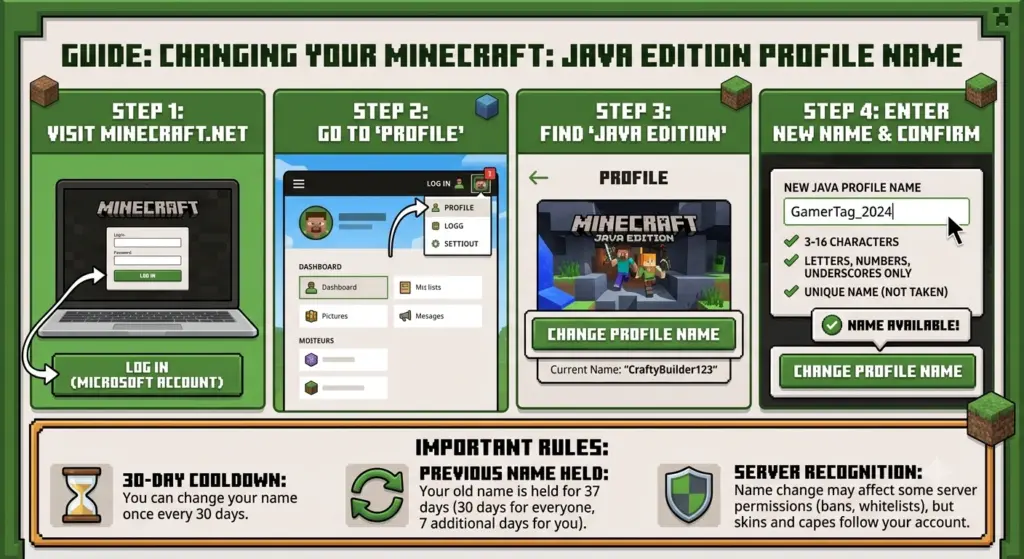
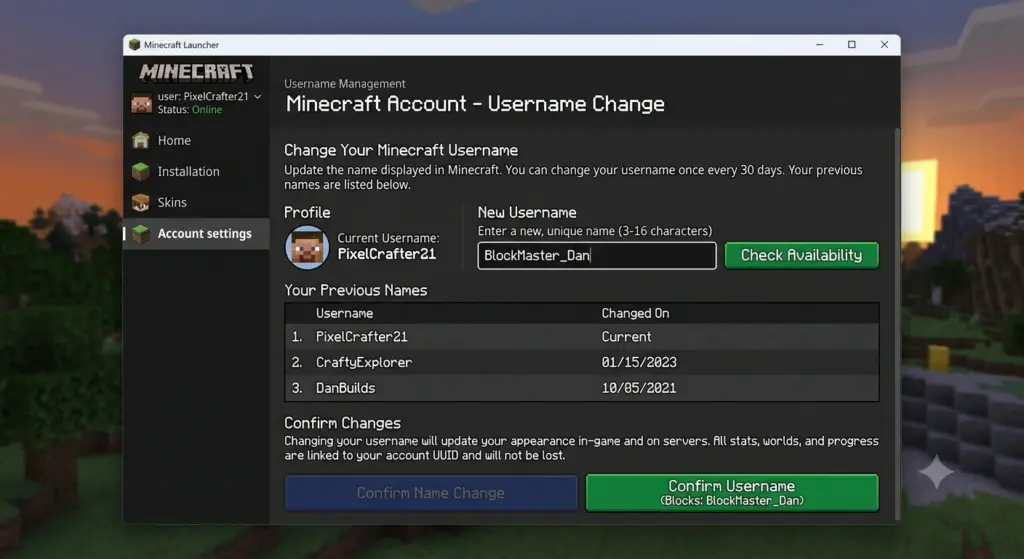
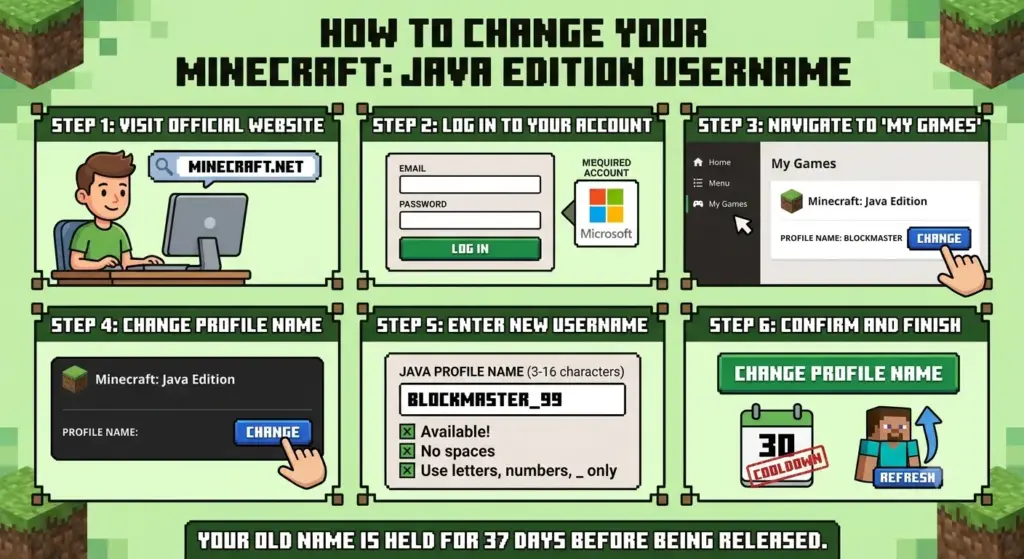
Can You Change Your Minecraft Username? Yes, you can change your Minecraft username. However, the exact process depends on whether you play Minecraft Java Edition or Bedrock Edition. For Java Edition, your in-game name is your Java profile name. You can change it through Minecraft.net by signing in with your Microsoft account and selecting Change Profile Name. Java profile names can be up to 16 characters, and Minecraft currently allows you to change the name once every 30 days. For Bedrock Edition, your in-game name is generally your Xbox/Microsoft gamertag, so you change the gamertag rather than the Java profile name. Quick Answer: Can You Change Your Minecraft Username? Minecraft version Can you change the name? Where? Important limit Java Edition Yes Minecraft.net Once every 30 days Bedrock Edition Yes Xbox/Microsoft account Gamertag rules apply Nintendo Switch Yes Nintendo account settings Platform-specific PlayStation Yes PSN/Microsoft account Depends on account setup The key difference is that Java Edition uses a Java profile name, while Bedrock generally uses the Xbox/Microsoft gamertag associated with your account. How to Change Your Minecraft Username on Java Edition If you play Minecraft Java Edition, changing your username is straightforward. Step 1: Go to Minecraft.net Visit Minecraft.net and sign in with the Microsoft account associated with your Minecraft Java Edition account. Make sure you’re using the correct Microsoft account. If you have multiple Microsoft accounts, signing into the wrong one can make it appear that your Minecraft profile or game is missing. Step 2: Find Minecraft Java Edition After signing in: Open All Games. Find Minecraft: Java Edition. Select Change Profile Name. This is the profile setting used to change your Java Edition name. Step 3: Enter Your New Username Enter the Minecraft username you want to use. Before confirming the change, check: Spelling Capitalization Character count Whether you actually want to keep the name Whether the name meets Minecraft’s requirements Java profile names can contain up to 16 characters. If you’re unsure about the character limit, see our guide explaining how many characters a Minecraft username can have before choosing your final name. Step 4: Confirm the Change Once you’ve entered an acceptable username, select the option to confirm the profile-name change. Your new Java profile name will then be associated with your existing Minecraft profile. If the Minecraft Launcher continues showing your old name, restarting the Launcher or signing out and signing back in can help refresh your account information. How Often Can You Change Your Minecraft Username? For Minecraft Java Edition, you can change your profile name once every 30 days. This means you should choose your new username carefully. For example: Old name: PixelMiner New name: ShadowMiner After changing to ShadowMiner, you’ll need to wait before making another Java profile-name change. Can You Change Back to Your Old Username? Yes. Minecraft’s Java profile-name system allows you to return to a previous profile name after the applicable waiting period, provided the name is available. Because of this waiting period, it’s better to consider several options before committing to a new username. If you want inspiration before making your decision, check out these unique Minecraft usernames for 2026. How to Change Your Minecraft Username on Bedrock Bedrock Edition works differently from Java.   When playing Minecraft Bedrock Edition with a Microsoft account, your in-game name is generally the Xbox/Microsoft gamertag associated with your account. To change it online, the basic process is: Sign in to your Microsoft/Xbox account. Open your Xbox profile. Select your gamertag. Choose the option to edit or change it. Enter your new gamertag. Follow Microsoft’s instructions to confirm the change. Your new gamertag can then appear as your name in Minecraft Bedrock. Important: Don’t confuse a Bedrock gamertag with a Java profile name. They are separate naming systems. Minecraft Username vs. Gamertag This is one of the biggest sources of confusion for Minecraft players. Java Edition Your Minecraft name is your Java profile name. Bedrock Edition Your Minecraft name is generally your Xbox/Microsoft gamertag when you’re playing with a Microsoft account. So if you’re searching for “how to change Minecraft username Java,” you need the Java profile-name settings. If you’re searching for “how to change Minecraft username Bedrock,” you’re generally looking for the Xbox gamertag settings. How Many Characters Can a Minecraft Username Have? A Minecraft Java profile name can be up to 16 characters long. This is important when creating a new username because a name longer than the allowed limit won’t work as a Java profile name. For example: ShadowCraft — 11 characters MinecraftPro — 12 characters UltimateMinecraftPlayer — too long for the 16-character Java limit If you’re struggling to find a short name that you like, try combining words, abbreviations, or numbers. You can also use a Minecraft username generator to create different combinations and find ideas that fit the character limit. What Happens When You Change Your Minecraft Username? Changing your Java profile name doesn’t mean you’re creating a completely new Minecraft account. You’re changing the profile name associated with your existing Java account. Your Minecraft account itself remains the same. This is different from creating an entirely new Microsoft account, which can result in a separate Minecraft account and separate account-related data. A username change should therefore be thought of as changing the name displayed for your existing profile rather than starting Minecraft over. Can You Change Your Minecraft Username Without Buying Minecraft Again? Yes. You don’t need to purchase Minecraft again simply because you want to change your Java profile name. You can change the Java profile name through your existing Minecraft account, subject to Minecraft’s rules and the applicable waiting period. Creating an entirely new Microsoft account, however, is a different situation and can result in a separate Minecraft account. Why Can’t I Change My Minecraft Username? If the username-change option isn’t working, check these possibilities. 1. You Changed Your Name Less Than 30 Days Ago Java profile names have a 30-day change interval. If you’ve already changed your name recently, you may

Can You Change Your Minecraft Username? Read More »

How to change my Minecraft username

How to Change My Minecraft Username

How to Change My Minecraft Username Yes, you can change your Minecraft name, but the process depends on which edition you play. On Minecraft: Java Edition, you change your Java profile name through your Minecraft account. On Minecraft: Bedrock Edition, your in-game name is generally your Xbox gamertag, so you change the gamertag associated with your Microsoft/Xbox account. Java profile names can be changed once every 30 days. Quick Answer If you play Minecraft Java Edition, sign in to your Minecraft account, go to All Games → Minecraft: Java Edition → Change Profile Name, enter your new name, and confirm it. If you play Minecraft Bedrock Edition, you generally need to change your Xbox gamertag instead. Before choosing a new name, it’s also worth checking whether your Minecraft username is taken so you don’t settle on a name that’s unavailable. How to Change Your Minecraft Username on Java Edition Changing a Java Edition username doesn’t require you to purchase Minecraft again or create a new account. Step 1: Sign in to your Minecraft account Open the official Minecraft website and sign in using the Microsoft account associated with your Minecraft Java Edition account. Make sure you’re using the correct Microsoft account. If you have multiple Microsoft accounts, signing into the wrong one can make it appear that your Minecraft profile or game is missing. Step 2: Open your Minecraft Java profile After signing in, navigate to your games/account area and locate Minecraft: Java Edition. Look for the option to Change Profile Name. Minecraft’s official support documentation provides the current instructions for changing a Java profile name. Step 3: Enter your new username Type the Minecraft username you want to use. Before submitting it, check: Spelling Capitalization Character count Whether you actually want to keep the name Whether the name meets Minecraft’s requirements Java profile names are limited to 16 characters. If you’re unsure about the character requirements, you can learn more about Minecraft username length and character limits before choosing your final name. Step 4: Confirm the change Once you’re satisfied with the name, confirm the profile-name change. Your new Java profile name should then be associated with your Minecraft profile. If your Launcher still displays the old information, restarting the Launcher or signing out and back in can help refresh the account information. How Often Can You Change Your Minecraft Username? For Minecraft Java Edition, you can change your profile name once every 30 days. For example, if you change your name on October 4, you shouldn’t expect to be able to change it again immediately. Important Don’t change your name impulsively. If you choose something you don’t like, you may have to wait until the 30-day period has passed before making another change. Minecraft also states that you can change back to a previous Java profile name after the applicable waiting period, provided the name is available. If you haven’t decided on a name yet, it’s better to explore several options before making the change. How to Change Your Minecraft Username on Bedrock Minecraft Bedrock Edition works differently from Java Edition. On Bedrock, the name other players see is generally your Xbox gamertag. Therefore, if you want to change your Bedrock Minecraft name, you generally need to change your Xbox gamertag associated with your Microsoft account. The basic process is: Sign in to your Microsoft/Xbox account. Open your Xbox profile. Select your gamertag. Choose the option to change it. Enter your new gamertag. Follow Microsoft’s instructions to confirm the change. Your new gamertag can then appear as your name in Minecraft Bedrock. Minecraft Username vs Xbox Gamertag This distinction is important because many players search for “how to change my Minecraft username” when they actually mean their Xbox gamertag. Feature Java Edition Bedrock Edition Main in-game name Java profile name Xbox gamertag Account system Microsoft account Microsoft/Xbox account Where name is changed Minecraft profile Xbox profile Java profile-name limit 16 characters Xbox gamertag rules apply Same name required? No Gamertag is used Minecraft’s official documentation distinguishes the Java profile name from the Xbox gamertag. Can You Change Your Minecraft Username for Free? For Java Edition, changing your profile name is different from buying a new Minecraft account. However, Bedrock gamertag changes are governed by Xbox/Microsoft’s gamertag policies, so don’t assume that Java’s username-change rules apply to Bedrock. The important thing is to identify your Minecraft edition before trying to change your name. How Many Characters Can a Minecraft Username Have? A Minecraft Java profile name can contain up to 16 characters. This makes character count an important consideration when creating a new Java username. For example: ShadowCraft — short enough PixelKnight — short enough DarkMinecraftPlayer — too long for a Java profile name If you’re creating a username specifically for Minecraft, keeping it short and memorable can also make it easier for friends to recognize. For more detailed information about the character limit and naming rules, see our guide to how long a Minecraft username can be. Why Can’t I Change My Minecraft Username? There are several reasons you may not be able to change your name. 1. You’re playing Bedrock If you’re on Bedrock, you’re probably looking for a Java profile-name option that doesn’t apply to your edition. Check your Xbox gamertag instead. 2. You changed your Java name recently Java profile names have a 30-day change interval. If you’ve already changed your name, you may need to wait. 3. You’re using the wrong Microsoft account If you have multiple Microsoft accounts, make sure you’re signed into the account connected to your Minecraft purchase/profile. 4. Your desired name isn’t available The username you want may already be unavailable or may not satisfy Minecraft’s current requirements. Try another variation rather than repeatedly submitting the same name. Does Changing Your Minecraft Username Delete Your Worlds? No, changing your Java profile name isn’t the same thing as creating a new Minecraft account. A username change changes the name associated with your existing Java profile. You aren’t creating a new

How to Change My Minecraft Username Read More »

Java username change walkthrough

How to Change Your Minecraft Username

How to Change Your Minecraft Username Changing your Minecraft username is relatively simple, but the exact process depends on whether you’re playing Minecraft Java Edition or Minecraft Bedrock Edition. For Java Edition, you change your Minecraft Java Profile Name through Minecraft.net. For Bedrock Edition, your in-game name is connected to your Xbox gamertag, so changing your gamertag changes the name shown in Minecraft. If you’re looking for a new name before making the change, you can explore our collection of Minecraft usernames or use our Minecraft username generator to create ideas. Can You Change Your Minecraft Username? Yes, you can change your Minecraft username. However, Java and Bedrock Edition use different naming systems. Feature Java Edition Bedrock Edition Name system Java Profile Name Xbox Gamertag Where to change it Minecraft.net Xbox/Microsoft profile Java name limit Up to 16 characters Based on gamertag rules Change frequency Once every 30 days Based on Xbox gamertag rules Microsoft account Required Required This distinction is important because changing a Java username and changing a Bedrock gamertag are not the same process. How to Change Your Minecraft Java Username If you play Minecraft Java Edition, you can change your Java Profile Name through your Minecraft account. 1. Sign in to Minecraft.net Go to Minecraft.net and sign in using the Microsoft account connected to your Minecraft Java Edition account. Make sure you’re using the correct account before making any changes. 2. Open Your Java Edition Profile After signing in, go to the area containing your Minecraft Java Edition account information. Look for the option to change your Java Profile Name. 3. Choose “Change Profile Name” Select the Change Profile Name option. Enter the new Minecraft username you want to use. Remember that Java Profile Names have a 16-character maximum. If you’re not sure whether your desired name is available, you can first learn how to check if a Minecraft username is taken. 4. Confirm Your New Username Review your new name carefully and confirm the change. Once the change has been processed, your new username should appear when you use Minecraft Java Edition. For more detailed information about the process, see our guide on how to change a Minecraft username. How to Change Your Minecraft Bedrock Username Minecraft Bedrock Edition handles usernames differently from Java Edition. Your Bedrock in-game name is generally your Xbox gamertag when you’re signed in with a Microsoft account. To change it: Sign in to your Microsoft/Xbox account. Open your Xbox profile. Find your current gamertag. Select the option to edit or change it. Enter your new gamertag. Follow the instructions to confirm the change. Open Minecraft again to see the updated name. Important Difference If you’re playing Java Edition, changing your Xbox gamertag doesn’t replace your Java Profile Name. If you’re playing Bedrock Edition, your Xbox gamertag is the name that is relevant to your Minecraft player profile. Minecraft Username vs. Xbox Gamertag A common mistake is assuming your Minecraft Java username and Xbox gamertag are automatically the same. They aren’t. Java Edition: Your Java Profile Name is used as your Minecraft in-game name. Bedrock Edition: Your Xbox/Microsoft gamertag is used as your player name. This is why a username change may appear to work differently depending on which Minecraft edition you’re using. If you specifically play Java Edition, our guide to Minecraft username rules and profile names can help you understand the naming system. How Often Can You Change Your Minecraft Username? For Minecraft Java Edition, you can change your Java Profile Name once every 30 days. Because of this restriction, don’t change your name impulsively. Before confirming your new username, check: Spelling Numbers Capitalization Overall appearance Whether it represents the identity you want to use If you change your mind immediately afterward, you won’t be able to simply change it again right away. This is especially important if you’re choosing a username for a long-term Minecraft account, SMP, PvP profile, YouTube channel, or gaming identity. What Is the Minecraft Java Username Character Limit? A Minecraft Java Profile Name can contain up to 16 characters. This makes shorter usernames particularly useful. For example: ShadowKnight — suitable PixelWarrior — suitable DarkMinecraftWarrior2026 — too long If your preferred username is too long, try shortening it rather than adding unnecessary numbers. For more information, read our guide on how long a Minecraft username can be. You can also browse our collection of short OG Minecraft usernames if you want something short and memorable. What Happens When You Change Your Minecraft Username? Changing your Minecraft Java Profile Name doesn’t mean you’re creating a new Minecraft account. You’re changing the name associated with your existing Java profile. Your Minecraft account remains the same. However, individual multiplayer servers can have their own systems for player names, permissions, ranks, statistics, or other data. Therefore, server-specific behavior can vary. If you’re changing your name because your current one no longer fits your style, you may want to read how to choose a good Minecraft username before making the change. Can You Change Back to Your Old Minecraft Username? For Java Edition, you can return to a previous profile name after the applicable waiting period. Because Java username changes have a 30-day interval, you shouldn’t expect to switch repeatedly between different names. Best practice: choose your new username carefully before confirming the change. If you’re unable to reclaim an old username, you can also learn why a Minecraft username may be taken. Why Can’t I Change My Minecraft Username? If you can’t change your username, check these common possibilities. You’re Still Within the 30-Day Period Java Profile Names have a 30-day change interval. If you recently changed your name, you’ll need to wait before changing it again. You’re Using the Wrong Microsoft Account Make sure you’re signed into the Microsoft account associated with your Minecraft Java Edition profile. If you’re signed into a different account, you may not see the Java profile you expect. Your Desired Name Isn’t Available Your preferred username may already be unavailable. Try another

How to Change Your Minecraft Username Read More »

How to change Minecraft Java username

Can You Change Your Username on Minecraft Java?

Can You Change Your Username on Minecraft Java? Yes, you can change your username on Minecraft Java Edition. Your in-game name in Java Edition is called your Java Profile Name, and you can change it through your Minecraft account. Minecraft Java Profile Names are separate from your Microsoft/Xbox Gamertag. If your goal is to change the name other players see when you play Java Edition, you need to change your Java Profile Name, not your Xbox Gamertag. Minecraft currently allows Java Profile Names to be changed once every 30 days, and they can be up to 16 characters long. If you’re still deciding what name to use, you can browse our collection of Minecraft usernames or generate ideas with our Minecraft username generator. How to Change Your Minecraft Java Username Changing your Minecraft Java username is relatively simple. You don’t need to create a new Minecraft account just to change your Java Profile Name. Follow these steps: 1. Sign in to Minecraft.net Go to Minecraft.net and sign in with the Microsoft account associated with your Minecraft Java Edition account. 2. Open your Minecraft account Once you’re signed in, go to All Games and find your Minecraft: Java Edition profile. 3. Select “Change Profile Name” Under Minecraft: Java Edition, look for the Change Profile Name option. 4. Enter your new username Enter the new Java Profile Name you want to use. Before confirming the change, check the spelling carefully. Java Profile Names can be up to 16 characters, and you won’t be able to change the name again immediately after making a change. If you’re worried that your preferred name might already be unavailable, learn how to check if a Minecraft username is taken before choosing one. 5. Confirm your new profile name Select the option to change your profile name and complete the process. Your new Java Profile Name will then be associated with your existing Minecraft Java profile. How Often Can You Change Your Minecraft Java Username? You can change your Minecraft Java Profile Name once every 30 days. For example, if you change: ShadowMiner → DarkPlayer you cannot immediately change it again if you decide you don’t like DarkPlayer. You’ll need to wait until the 30-day cooldown has passed. Because of this cooldown, it’s a good idea to choose your next name carefully. Before making the change, you can explore good Minecraft usernames or browse unique Minecraft usernames for inspiration. How Long Can a Minecraft Java Username Be? A Minecraft Java Profile Name can contain up to 16 characters. This means a name such as: Steve — 5 characters PixelKnight — 11 characters ShadowMinecraft — 15 characters fits within the limit. A name such as: UltimateMinecraftPro — 20 characters would be too long. If you’re specifically looking for shorter names, check out our guide to how long a Minecraft username can be or browse these short OG Minecraft usernames. Minecraft Java Username vs. Microsoft Gamertag One of the most common sources of confusion is the difference between your Minecraft Java Profile Name and your Microsoft/Xbox Gamertag. For Minecraft Java Edition, your in-game character name is your Java Profile Name, not your Gamertag, although the two names can be identical. Feature Java Profile Name Microsoft/Xbox Gamertag Used as your Java Edition in-game name Yes No Separate from the other name Yes Yes Managed through the Minecraft Java profile Yes No Used for Xbox services No Yes Java name limit Up to 16 characters Separate rules Java name cooldown 30 days Separate system So if you want to change the name that other players see in Minecraft Java Edition, change your Java Profile Name rather than your Xbox Gamertag. For a broader explanation, see our guide on how to change a Minecraft username. What Happens When You Change Your Minecraft Username? Changing your Java Profile Name does not mean you’re creating a new Minecraft account. You’re simply changing the profile name associated with your existing Java Edition profile. Before changing your name, make sure that: You’re signed into the correct Microsoft account. You’ve selected the correct Minecraft Java profile. Your new name meets the current requirements. Your name is no longer than 16 characters. You’re comfortable with the 30-day cooldown. You’ve checked the spelling carefully. If you’re still deciding what name to use, our guide on how to choose a good Minecraft username can help you narrow down your options. Can You Change Back to Your Old Minecraft Username? Yes, but you cannot immediately switch back. Minecraft’s current support documentation states that after changing your Java Profile Name, you can return to your old name after waiting 30 days. For example: Old name: ShadowMiner New name: DarkPlayer If you later decide that you prefer ShadowMiner again, you need to wait for the applicable cooldown before changing your profile name back. This is why you should think carefully before confirming a new name. If your previous name appears unavailable, you can also read why your Minecraft username may be taken. Why Can’t I Change My Minecraft Username? There are several reasons why you might not be able to change your Minecraft Java username. You Recently Changed It The first thing to check is the 30-day cooldown. Minecraft currently limits Java Profile Name changes to once every 30 days. If you’ve changed your name recently, you may simply need to wait until the cooldown expires. Your Name Is Too Long Java Profile Names can be up to 16 characters. If your preferred name exceeds the limit, try shortening it. You can read more about how long a Minecraft username can be before choosing your final name. You’re Signed Into the Wrong Microsoft Account Make sure you’re signed into the Microsoft account that owns the Minecraft Java Edition profile you want to modify. If you’re signed into a different account, you may not see the Java profile you expect. You’re Trying to Change Your Gamertag If you’re changing your Microsoft/Xbox Gamertag and expecting your Minecraft Java name to change, you’re changing a

Can You Change Your Username on Minecraft Java? Read More »