how do i change my minecraft username
Yes, you can change your Minecraft username, but the process depends on which version of Minecraft you play. For Minecraft Java Edition, you can change your Java profile name through Minecraft.net. For Minecraft Bedrock Edition, your in-game name is generally connected to your Xbox/Microsoft gamertag.
If you’re looking for a new Minecraft username, this guide explains exactly how to change it, how often you can change it, and what to do if your preferred name is already taken.
Can You Change Your Minecraft Username?
Yes, but Java and Bedrock Edition handle usernames differently.
- Minecraft Java Edition: You can change your Java profile name through your Minecraft account.
- Minecraft Bedrock Edition: Your in-game name is generally your Xbox/Microsoft gamertag.
- Java username limit: Java profile names can be up to 16 characters.
- Java name changes: You generally need to wait 30 days before changing your Java profile name again.
Before choosing a new name, it’s also useful to understand how long a Minecraft username can be.
How to Change Your Minecraft Java Username
If you play Minecraft Java Edition, changing your profile name is relatively simple.
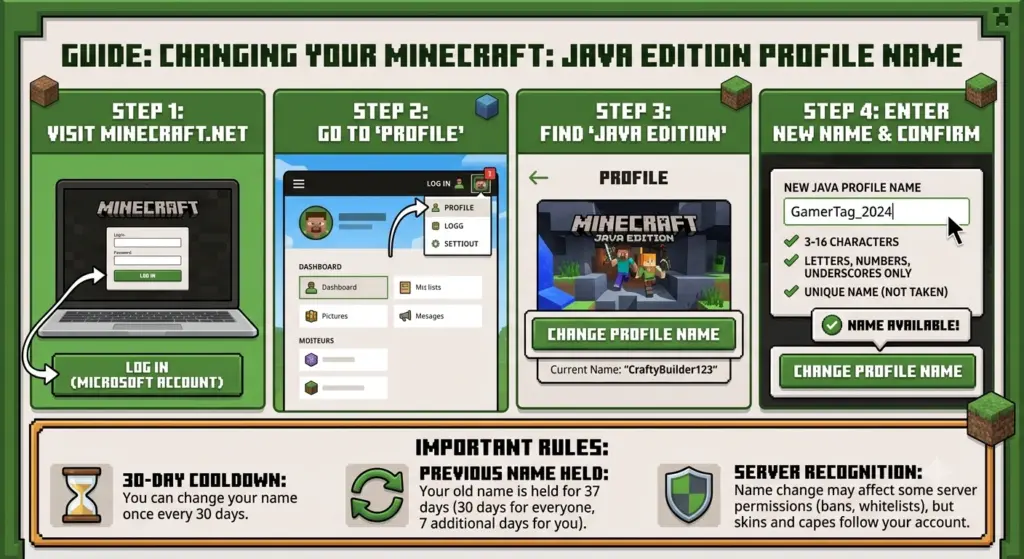
Step 1: Sign In to Minecraft.net
Go to Minecraft.net and sign in with the Microsoft account associated with your Minecraft Java Edition account.
Make sure you’re using the correct account before changing anything. If you have multiple Microsoft accounts, check which one owns your Minecraft Java profile.
Step 2: Open Your Minecraft Java Profile
After signing in, find your Minecraft Java Edition profile.
Look for the option to change your profile name. Minecraft provides a dedicated profile-name setting for Java Edition.
Step 3: Select “Change Profile Name”
Choose Change Profile Name and enter the username you want to use.
Your new Java username should follow Minecraft’s username requirements. If you’re unsure about the character restrictions, read our guide on how long a Minecraft username can be.
Step 4: Enter Your New Username
Type your desired username into the available field.
Before confirming the change, check the spelling carefully. It’s also a good idea to make sure the name fits the style you’re looking for.
If you need inspiration, you can use our Minecraft username generator to find new name ideas.
Step 5: Confirm the Change
Once you’ve selected your new username, follow the instructions to confirm the change.
Your new Java profile name will become the name displayed when you play Minecraft Java Edition.
How to Change Your Minecraft Bedrock Username
Minecraft Bedrock Edition works differently from Java Edition.
When you’re playing Bedrock Edition while signed into a Microsoft account, your Minecraft name is generally associated with your Xbox gamertag.
Therefore, if you want to change your Bedrock Minecraft name, you generally need to change your Xbox/Microsoft gamertag rather than a separate Minecraft Java profile name.
The exact steps can vary depending on the platform you’re using, such as Windows, Xbox, PlayStation, Nintendo Switch, Android, or iOS.
Minecraft Username vs. Gamertag
One of the biggest sources of confusion is the difference between a Minecraft Java username and an Xbox gamertag.
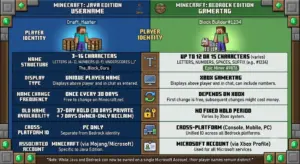
| Minecraft Version | Name Typically Used | Where You Change It |
|---|---|---|
| Java Edition | Java profile name | Minecraft account |
| Bedrock Edition | Xbox/Microsoft gamertag | Xbox/Microsoft account |
So, if you’re playing Java Edition, follow the Java username process. If you’re playing Bedrock Edition, check your connected Microsoft/Xbox account.
How Often Can You Change Your Minecraft Username?
Minecraft Java Edition has a 30-day waiting period between profile-name changes.
That means you shouldn’t change your username without thinking carefully about your choice.
If you’re planning to switch to a completely different name, consider what you want your Minecraft identity to be before confirming the change.
You can also read our guide on how to choose a good Minecraft username for ideas and naming tips.
What If Your Minecraft Username Is Already Taken?
If the username you want isn’t available, you’ll need to choose another one.
Before spending time creating variations, you can check if a Minecraft username is taken.
If your preferred name is unavailable, try:
- Adding a short word
- Using a different spelling
- Combining two relevant words
- Creating a shorter variation
- Using a unique gaming-style name
- Trying a different word combination
If you want inspiration, browse these cool Minecraft usernames for ideas.
How to Find a Unique Minecraft Username
Finding a username that feels original can be difficult, especially if you want something short and memorable.
Instead of randomly adding numbers to an unavailable username, think about combining words that represent your personality, gaming style, favorite themes, or interests.
For more ideas, see our guide on how to find a unique Minecraft username.
You can also use a username generator to create combinations you might not have considered yourself.
What Makes a Good Minecraft Username?
A good Minecraft username should ideally be:
- Easy to remember
- Easy to spell
- Relatively short
- Unique
- Suitable for your gaming identity
- Something you’ll still like later
Avoid choosing a name simply because it’s available. Since your username can become part of your identity on Minecraft servers and multiplayer communities, it’s worth choosing something you’re comfortable keeping.
Can You Change Your Minecraft Username Back?
For Java Edition, you can change your profile name again after the required waiting period.
If you’re considering changing your username temporarily, remember that you may not be able to immediately switch back.
That’s another reason to think carefully about your new username before confirming the change.
Can You Change Your Minecraft Username on Java?
Yes. Minecraft Java Edition allows you to change your Java profile name.
If this is the exact question you’re trying to answer, you can also read our dedicated guide on can you change your username on Minecraft Java.
The key point is that Java Edition uses a separate profile-name system, while Bedrock generally uses the connected Xbox/Microsoft gamertag.
Can You Change Your Minecraft Username on Mobile?
If you’re playing Minecraft on a mobile device, you’re generally playing Bedrock Edition.
Your in-game name is therefore normally connected to the Xbox/Microsoft account you’re using with Minecraft.
If you want to change that name, check the gamertag associated with your Microsoft/Xbox account.
Can You Change Your Minecraft Username on Xbox?
Yes. Minecraft Bedrock on Xbox uses your Xbox gamertag as your in-game identity.
To change it, you’ll generally need to change your Xbox gamertag through your Xbox/Microsoft account.
Keep in mind that changing your gamertag can affect how your name appears in other Xbox services and games, not just Minecraft.
Frequently Asked Questions
How do I change my Minecraft username?
For Java Edition, sign in to your Minecraft account, open your Java profile, select the profile-name change option, enter your new username, and confirm it.
For Bedrock Edition, your Minecraft name is generally your Xbox/Microsoft gamertag, so you need to change your gamertag.
Can I change my Minecraft username for free?
Java Edition profile-name changes are handled through your Minecraft account. Bedrock Edition uses the Xbox/Microsoft gamertag system, where gamertag-change policies may apply.
How many characters can a Minecraft username have?
Minecraft Java profile names can be up to 16 characters. For a detailed explanation, see how long can a Minecraft username be.
How often can I change my Minecraft username?
Minecraft Java profile names can generally be changed once every 30 days.
Is Minecraft username the same as gamertag?
Not necessarily. Java Edition uses a Java profile name, while Bedrock Edition generally uses the Xbox/Microsoft gamertag connected to your account.
What should I do if my Minecraft username is taken?
Choose another available name or create a variation. You can first check if a Minecraft username is taken and then use the Minecraft username generator for additional ideas.
How can I choose a good Minecraft username?
Think about the type of identity you want to create. A good username should be memorable, easy to spell, and fit your gaming style. Our guide on how to choose a good Minecraft username provides additional ideas.
Can I get my old Minecraft username back?
For Java Edition, you can change your profile name again after the applicable waiting period. If you want to return to an old name, make sure it’s still available when you’re eligible to change your name.
Conclusion
Changing your Minecraft username is straightforward once you know which edition you’re playing.
For Minecraft Java Edition, change your Java profile name through your Minecraft account. For Minecraft Bedrock Edition, your in-game name is generally connected to your Xbox/Microsoft gamertag.
Before changing your name, check the username requirements and make sure you’re happy with your choice. If your preferred name is already taken, use the Minecraft username generator or browse cool Minecraft usernames to find alternatives.
If you want something more original, you can also learn how to find a unique Minecraft username.