How to Change Your Minecraft Username
Changing your Minecraft username is relatively simple, but the exact process depends on whether you’re playing Minecraft Java Edition or Minecraft Bedrock Edition.
For Java Edition, you change your Minecraft Java Profile Name through Minecraft.net. For Bedrock Edition, your in-game name is connected to your Xbox gamertag, so changing your gamertag changes the name shown in Minecraft.
If you’re looking for a new name before making the change, you can explore our collection of Minecraft usernames or use our Minecraft username generator to create ideas.
Can You Change Your Minecraft Username?
Yes, you can change your Minecraft username. However, Java and Bedrock Edition use different naming systems.
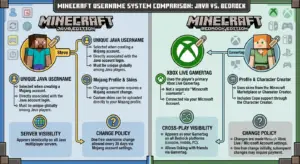
| Feature | Java Edition | Bedrock Edition |
|---|---|---|
| Name system | Java Profile Name | Xbox Gamertag |
| Where to change it | Minecraft.net | Xbox/Microsoft profile |
| Java name limit | Up to 16 characters | Based on gamertag rules |
| Change frequency | Once every 30 days | Based on Xbox gamertag rules |
| Microsoft account | Required | Required |
This distinction is important because changing a Java username and changing a Bedrock gamertag are not the same process.
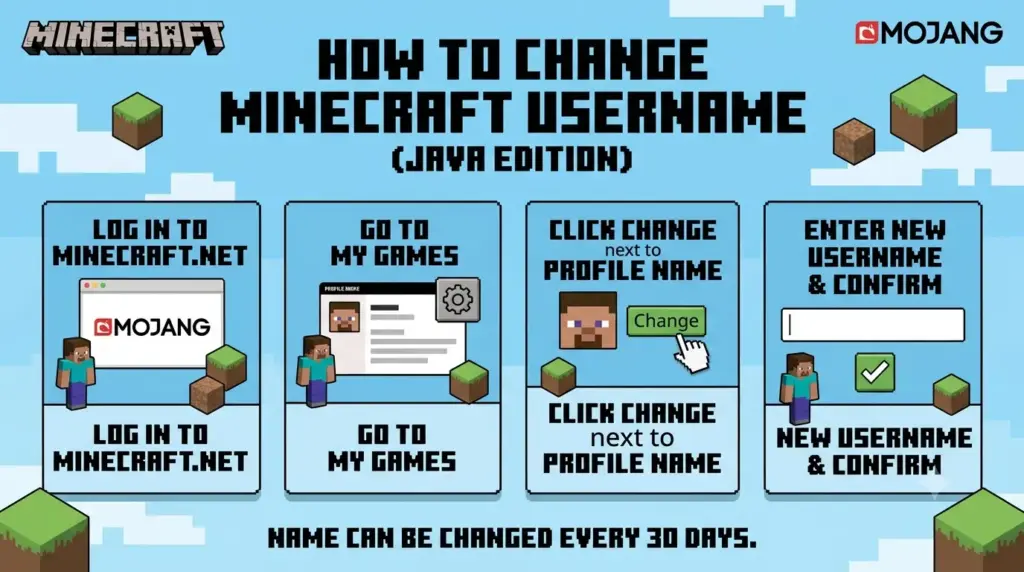
How to Change Your Minecraft Java Username
If you play Minecraft Java Edition, you can change your Java Profile Name through your Minecraft account.
1. Sign in to Minecraft.net
Go to Minecraft.net and sign in using the Microsoft account connected to your Minecraft Java Edition account.
Make sure you’re using the correct account before making any changes.
2. Open Your Java Edition Profile
After signing in, go to the area containing your Minecraft Java Edition account information.
Look for the option to change your Java Profile Name.
3. Choose “Change Profile Name”
Select the Change Profile Name option.
Enter the new Minecraft username you want to use.
Remember that Java Profile Names have a 16-character maximum.
If you’re not sure whether your desired name is available, you can first learn how to check if a Minecraft username is taken.
4. Confirm Your New Username
Review your new name carefully and confirm the change.
Once the change has been processed, your new username should appear when you use Minecraft Java Edition.
For more detailed information about the process, see our guide on how to change a Minecraft username.
How to Change Your Minecraft Bedrock Username
Minecraft Bedrock Edition handles usernames differently from Java Edition.
Your Bedrock in-game name is generally your Xbox gamertag when you’re signed in with a Microsoft account.
To change it:
- Sign in to your Microsoft/Xbox account.
- Open your Xbox profile.
- Find your current gamertag.
- Select the option to edit or change it.
- Enter your new gamertag.
- Follow the instructions to confirm the change.
- Open Minecraft again to see the updated name.
Important Difference
If you’re playing Java Edition, changing your Xbox gamertag doesn’t replace your Java Profile Name.
If you’re playing Bedrock Edition, your Xbox gamertag is the name that is relevant to your Minecraft player profile.
Minecraft Username vs. Xbox Gamertag
A common mistake is assuming your Minecraft Java username and Xbox gamertag are automatically the same.
They aren’t.
Java Edition: Your Java Profile Name is used as your Minecraft in-game name.
Bedrock Edition: Your Xbox/Microsoft gamertag is used as your player name.
This is why a username change may appear to work differently depending on which Minecraft edition you’re using.
If you specifically play Java Edition, our guide to Minecraft username rules and profile names can help you understand the naming system.
How Often Can You Change Your Minecraft Username?
For Minecraft Java Edition, you can change your Java Profile Name once every 30 days.
Because of this restriction, don’t change your name impulsively.
Before confirming your new username, check:
- Spelling
- Numbers
- Capitalization
- Overall appearance
- Whether it represents the identity you want to use
If you change your mind immediately afterward, you won’t be able to simply change it again right away.
This is especially important if you’re choosing a username for a long-term Minecraft account, SMP, PvP profile, YouTube channel, or gaming identity.
What Is the Minecraft Java Username Character Limit?
A Minecraft Java Profile Name can contain up to 16 characters.
This makes shorter usernames particularly useful.
For example:
- ShadowKnight — suitable
- PixelWarrior — suitable
- DarkMinecraftWarrior2026 — too long
If your preferred username is too long, try shortening it rather than adding unnecessary numbers.
For more information, read our guide on how long a Minecraft username can be.
You can also browse our collection of short OG Minecraft usernames if you want something short and memorable.
What Happens When You Change Your Minecraft Username?
Changing your Minecraft Java Profile Name doesn’t mean you’re creating a new Minecraft account.
You’re changing the name associated with your existing Java profile.
Your Minecraft account remains the same.
However, individual multiplayer servers can have their own systems for player names, permissions, ranks, statistics, or other data. Therefore, server-specific behavior can vary.
If you’re changing your name because your current one no longer fits your style, you may want to read how to choose a good Minecraft username before making the change.
Can You Change Back to Your Old Minecraft Username?
For Java Edition, you can return to a previous profile name after the applicable waiting period.
Because Java username changes have a 30-day interval, you shouldn’t expect to switch repeatedly between different names.
Best practice: choose your new username carefully before confirming the change.
If you’re unable to reclaim an old username, you can also learn why a Minecraft username may be taken.
Why Can’t I Change My Minecraft Username?
If you can’t change your username, check these common possibilities.
You’re Still Within the 30-Day Period
Java Profile Names have a 30-day change interval.
If you recently changed your name, you’ll need to wait before changing it again.
You’re Using the Wrong Microsoft Account
Make sure you’re signed into the Microsoft account associated with your Minecraft Java Edition profile.
If you’re signed into a different account, you may not see the Java profile you expect.
Your Desired Name Isn’t Available
Your preferred username may already be unavailable.
Try another username or create a variation.
If you’re having trouble finding an available name, see how to find a unique Minecraft username for ideas and strategies.
You’re Confusing Java and Bedrock
The process is different for the two editions.
Java uses a Java Profile Name, while Bedrock uses the Xbox/Microsoft gamertag system.
Your Name Doesn’t Meet the Applicable Rules
Minecraft usernames need to comply with the applicable naming requirements.
If you’re choosing a Java name, remember the 16-character limit.
You can also browse unique Minecraft usernames if you need alternatives.
How to Choose a Good Minecraft Username
If you’re changing your username, don’t just pick the first available name.
A strong Minecraft username should ideally be:
- Short
- Easy to spell
- Easy to remember
- Distinctive
- Appropriate for multiplayer
- Suitable for your gaming identity
You can also avoid excessive numbers, complicated spelling, and names that may quickly become outdated.
For more guidance, see our complete guide on how to choose a good Minecraft username.
Minecraft Username Ideas
Different Minecraft players prefer different naming styles.
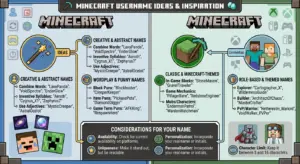
Some popular options include:
Cool: ShadowVex, NightRush
Cute: PixelBunny, MochiCraft
Fantasy: DragonVale, MysticRune
PvP: VoidStrike, ClutchVex
Simple: NovaPlay, PixelFox
If you need more inspiration, explore:
- Cool Minecraft usernames
- Cute Minecraft usernames
- Aesthetic Minecraft usernames
- Dark Minecraft usernames
- Funny Minecraft usernames
For specific Minecraft playstyles, you can also browse Minecraft SMP names and Minecraft PvP names.
If you want to generate ideas instead of choosing from a list, try our Minecraft username generator.
Minecraft Username Change — Java vs. Bedrock
| Question | Java | Bedrock |
|---|---|---|
| Can I change my name? | Yes | Yes |
| Main name system | Java Profile Name | Xbox Gamertag |
| Change location | Minecraft.net | Xbox/Microsoft |
| 16-character Java limit | Yes | Not applicable as a Java profile rule |
| 30-day Java cooldown | Yes | Not the same Java system |
| Microsoft account | Yes | Yes |
The most important difference is that Java Profile Names and Xbox Gamertags are separate naming systems.
Frequently Asked Questions
Can I change my Minecraft username?
Yes. Java Edition players can change their Java Profile Name through Minecraft.net. Bedrock players generally change the Xbox gamertag connected to their Microsoft account.
If you want to choose a new name first, explore our Minecraft username ideas before making the change.
How do I change my Minecraft username on Java?
Sign in to Minecraft.net with your Microsoft account, open your Minecraft Java Edition profile, choose Change Profile Name, enter your new name, and confirm the change.
You can also read our detailed guide on how to change your Minecraft username.
How often can I change my Minecraft Java username?
You can change your Minecraft Java Profile Name once every 30 days.
Because of this cooldown, make sure you’re happy with your new username before confirming the change.
How many characters can a Minecraft Java username have?
A Java Profile Name can be up to 16 characters.
If you’re specifically looking for a shorter username, check out these short OG Minecraft usernames.
Is a Minecraft username the same as a Gamertag?
Not necessarily.
Java Edition uses a Java Profile Name, while Bedrock Edition uses the Xbox/Microsoft gamertag system.
Can I change my Minecraft username on Bedrock?
You can change the Xbox gamertag associated with your Microsoft account, which is used as your player name in Bedrock.
Will changing my username delete my Minecraft worlds?
Changing your profile name isn’t the same as creating a new account. Your existing account remains your account.
However, individual multiplayer servers may handle player data differently.
Why is my Minecraft username not changing?
Check whether you’re using the correct Microsoft account, whether you’re within the Java 30-day change period, and whether the new name meets the applicable requirements.
If the issue is that your desired name is unavailable, read why your Minecraft username is taken.
Conclusion
Changing your Minecraft username depends on which edition you play.
For Java Edition, change your Java Profile Name through Minecraft.net. Java Profile Names have a 16-character maximum and can be changed once every 30 days.
For Bedrock Edition, your Minecraft player name is connected to your Xbox/Microsoft gamertag, so you need to change your gamertag instead.
Before making the change, choose your new username carefully. Check its availability, make sure it fits the applicable requirements, and consider whether it matches the gaming identity you want to build.
If you need inspiration, start with our Minecraft username generator, then explore good Minecraft usernames, cool Minecraft usernames, or unique Minecraft usernames.